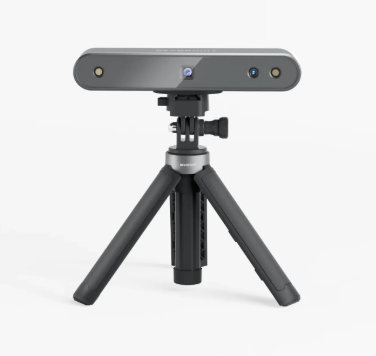
The Revopoint POP 2 is a portable 3D scanner that captures the shape and surface details of a physical object and turns them into a digital 3D model. It can be used for 3D printing, reverse engineering, digital archiving, product design, art, and prototyping.
The scanner projects infrared structured light onto an object while cameras capture its shape from different angles. The user slowly moves the scanner around the object—or rotates the object in front of the scanner—while software combines the captured information into a three-dimensional model. Finished scans can be exported in formats including STL, OBJ, and PLY for further editing or 3D printing.
Compatible Objects
The POP 2 works best with objects that have visible surface details and matte, non-reflective finishes. Transparent, highly reflective, or very dark objects can be difficult to capture and may require scanning spray or other preparation. Direct bright sunlight can also interfere with scanning.
Before You Begin
The POP 2 uses a Class 1 infrared light source and is designed for normal scanning use. Handle the scanner carefully and avoid touching or scratching the cameras and sensors.
Before scanning, remove unnecessary objects from the scanning area and make sure you have enough room to safely move around your subject. If using scanning sprays, follow the product's ventilation and handling instructions.
New to 3D scanning? Begin with a medium-sized, matte object with an irregular shape and plenty of surface detail. Simple glossy, transparent, or highly symmetrical objects can actually be more challenging for a first scan.