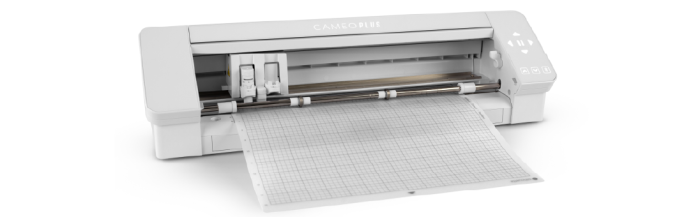
The Silhouette Cameo 4 Plus is an electronic cutting machine used to precisely cut digital designs from thin craft materials. With a wider cutting area than a standard Cameo, it is useful for creating vinyl decals, signs, stickers, heat-transfer designs, paper crafts, stencils, labels, and other custom projects.
Designs are created or imported into Silhouette Studio software, where users can resize, arrange, and prepare them for cutting. Material is loaded into the machine, with or without a cutting mat when appropriate, and a small blade follows the digital cut lines while rollers move the material through the machine.
Compatible Materials
Depending on the blade and setup, the Cameo 4 Plus can work with adhesive vinyl, heat-transfer vinyl, paper, cardstock, sticker paper, and select specialty craft materials. Different materials may require specific blades, cutting mats, force, speed, and blade-depth settings. Silhouette offers light-, standard-, and strong-tack cutting mats for the Cameo Plus for different material needs.
Before You Begin
The Cameo contains a sharp moving blade and powered rollers. Keep fingers, hair, jewelry, and loose clothing away from the blade carriage and rollers while the machine is operating. Do not reach into the cutting area or attempt to reposition material during a cut.
Make sure the material is properly aligned and secured before beginning. A small test cut is recommended when using an unfamiliar material or new settings.
New to digital cutting? Start with adhesive vinyl or cardstock and a simple design to become familiar with Silhouette Studio, material loading, cut settings, weeding, and safely removing finished projects.