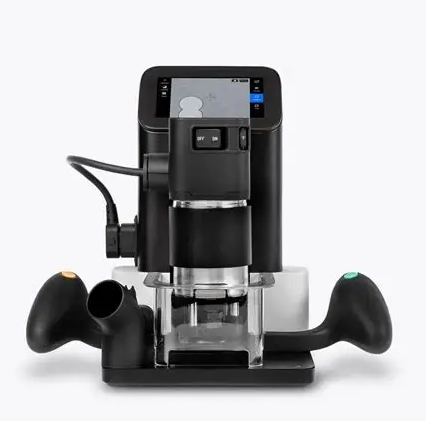
The Shaper Origin is a handheld CNC router that combines digital precision with manual woodworking. It is used to create custom shapes, joinery, inlays, signs, engravings, and precisely fitted components. Shaper Origin is guided by the user while its motorized cutting system makes small adjustments to keep the router bit aligned with the digital design.
To operate, a design is created directly on the tool or imported as an SVG file. Special adhesive ShaperTape is applied to the work surface, allowing the tool's onboard camera to track its position. The user selects a cutting path and depth on the touchscreen, then guides the router along the displayed path while the machine automatically corrects small positioning errors.
Compatible Materials
Shaper Origin can cut solid wood, plywood, and MDF. With appropriate router bits and settings, it can also process certain plastics. Material compatibility depends on the cutting bit, spindle speed, cutting depth, and work holding setup.
Before You Begin
Shaper Origin uses a high-speed rotating router bit that presents serious hazards. Wear eye and hearing protection, use appropriate dust collection, and keep both hands on the tool's designated handles during operation. Secure loose clothing, jewelry, and long hair.
Ensure the workpiece is firmly secured and that ShaperTape is properly positioned for accurate tracking. Check that the cutting path is clear of clamps, screws, and other obstructions. Disconnect the power before changing router bits or performing maintenance.
New to using Shaper Origin? Start with a simple shape on a securely fastened piece of plywood. Practice scanning ShaperTape, positioning a digital design, setting cutting depths, and following the tool's guidance before attempting complex projects.